Tech & DevOps HubEspace Tech & DevOps: Explorez le monde du Dev, du Cloud et des outils DevOps à travers nos articles et discussions Explore the world of development, the cloud and DevOps tools
Mise en place d'un pipeline CI/CD (3/4) - La branche staging

Nous séparons cette fois les tests unitaires isolés (rapides) des tests d'intégration, où les bases de données et services externes sont accessibles.
Nous ajoutons également au pipeline, les tests API avec Newman ainsi que les tests de charge avec Grafana k6, et enfin nous affichons le badge CI de la branche pour suivre l'état du pipeline en direct
Stratégie multi-branches, rôle pour la branche "staging"
Pour structurer la CI/CD, j'ai choisi une stratégie multi-branches avec des responsabilités claires:→ Son environnement se rapproche de celui de production:
→ Utilise une base de données réelle (service container GitHub), fait le démarrage de l'app, tests API et tests de charge seront ajoutés au comportement du workflow
→ Protège [main] avec plusieurs “gates” successifs (qualité, sécurité, performance)
La séparation des responsabilités rend chaque pipeline plus lisible, plus facile à maintenir et, limite les effets de bord entre branches
L'idée est de garder un pipeline axé qualité sur develop, et de durcir les contrôles sur staging
Création de la branche:
git switch -C staging
git push origin staging
git switch -c develop remplace avantageusement checkout -b, pour la clarté et la sécurité.
git checkout n'est pas supprimé, on peut continuer à l'utiliser Voir les flashcards Git
Mise en place et étapes du pipeline
Déja dans le pipeline
CI de base
CI de base (modifié)
Ajout spécial (staging/main)
Artefacts (upload/download)
Le workflow est défini dans: .github/workflows/ci-staging.yml
name: CI - Staging
on:
  push:
    branches: [ staging ]
  pull_request:
    branches: [ staging ]
  workflow_dispatch:

permissions:
  contents: read
  security-events: write
On lui donne ensuite les permissions:
security-events: write est requis pour CodeQL
→ Résultats d'analyse depuis le projet : Onglet Security
Le pipeline ci-staging se compose de 3 jobs:
ci-staging.yaml
on: push

1. Le job "build-test-static-analysis"
jobs:
  build-test-static-analysis:
    runs-on: ubuntu-24.04
    services:
      postgres:
        image: postgres:16
        ports:
          - 5432:5432
        env:
          POSTGRES_DB: flashcardsdb
          POSTGRES_USER: postgres
          POSTGRES_PASSWORD: ${{ secrets.POSTGRES_PASSWORD }}
        options: >-
          --health-cmd pg_isready
          --health-interval 10s
          --health-timeout 5s
          --health-retries 10
Le job tourne sur Ubuntu 24.04
On lance un Service Container pour PostgreSQL,
indispensable pour les tests d'intégration
L'option --health-cmd pg_isready est cruciale
Cette option garantit que l'application Spring Boot ne tentera pas de démarrer avant que PostgreSQL ne soit totalement prêt à accepter des connexions
steps:
  - name: Checkout code
    uses: actions/checkout@v6.0.1

  - name: Set up JDK 17
    uses: actions/setup-java@v5
    with:
      distribution: 'temurin'
      java-version: '17'

  - name: Cache Maven dependencies
    uses: actions/cache@
    with:
      path: ~/.m2/repository
      key: ${{ runner.os }}-maven-${{ hashFiles('**/pom.xml') }}

  - name: Check formatting (Spotless)
    run: ./mvnw spotless:check

  - name: Initialize CodeQL
    uses: github/codeql-action/init@v4.32.2
    with:
      languages: java
Les étapes:
On ajoute un Cache Maven dependencies:
On ajoute (CI de base)
- name: Wait for PostgreSQL
  run: |
    until pg_isready -h localhost -p 5432 -U postgres; do
      sleep 2
    done
On attends que Postgres soit prêt
- name: Run Unit Tests
  env:
    SPRING_PROFILES_ACTIVE: test
  run: ./mvnw -B clean test

- name: Run Integration Tests
  env:
    SPRING_PROFILES_ACTIVE: it
    SPRING_DATASOURCE_URL: jdbc:postgresql://localhost:5432/flashcardsdb
    SPRING_DATASOURCE_USERNAME: postgres
    SPRING_DATASOURCE_PASSWORD: ${{ secrets.POSTGRES_PASSWORD }}
  run: ./mvnw -B verify -DskipUnitTests=true
On sépare les tests:
On fait tourner les test unitaire avec le profil "test":On fait tourner les test d'intégration avec le profil "it"
- name: Verify Coverage 70%
  run: ./mvnw -B clean verify jacoco:report -Djacoco.minimum.coverage=0.70

- name: Upload JaCoCo artifacts
  uses: actions/upload-artifact@v6
  with:
    name: jacoco-report
    path: |
      target/site/jacoco/index.html
      target/site/jacoco/jacoco.xml

- name: Upload application JAR
  uses: actions/upload-artifact@v6
  with:
    name: app-jar
    path: target/*.jar
    if-no-files-found: error

- name: Perform CodeQL analysis
  uses: github/codeql-action/analyze@v4.32.2

- name: Scan filesystem with Trivy
  uses: aquasecurity/trivy-action@v0.28
  with:
    scan-type: fs
    scan-ref: .
    format: table
    severity: HIGH,CRITICAL
Si c'est la cas il génère les rapports
Il peut ensuite télécharger les artifacts:
| Name | Size |
|---|---|
| jacoco-report | 5.03 KB |
| app-jar | 50.4 MB |
Et terminer avec l'exécution des analyses:
2. Le job "functional-tests"
functional-tests:
  runs-on: ubuntu-24.04
  needs: build-test-static-analysis
  services:
    postgres:
      image: postgres:16
      ports:
        - 5432:5432
      env:
        POSTGRES_DB: flashcardsdb
        POSTGRES_USER: postgres
        POSTGRES_PASSWORD: ${{ secrets.POSTGRES_PASSWORD }}
On lance un Service Container pour PostgreSQL;
Indispensable pour les tests d'intégration
steps:
  - name: Checkout code
    uses: actions/checkout@v6.0.1

  - name: Download application JAR
    uses: actions/download-artifact@v7
    with:
      name: app-jar
      path: app-jar

  - name: Set up JDK 17
    uses: actions/setup-java@v5
    with:
      distribution: 'temurin'
      java-version: '17'

  - name: Start Spring Boot
    run: |
      cd app-jar
      touch spring.log

      nohup java \
        -Dspring.datasource.url=jdbc:postgresql://localhost:5432/flashcardsdb \
        -Dspring.datasource.username=postgres \
        -Dspring.datasource.password=${{ secrets.POSTGRES_PASSWORD }} \
        -Dspring.profiles.active=staging \
        -Dserver.port=8081 \
        -jar flashcards-1.0.0.jar \
        >> spring.log 2>&1 &

      for i in {1..30}; do
        nc -z localhost 8081 && break
        sleep 2
      done
      nc -z localhost 8081 || exit 1
Les étapes:
On télécharge l'artefact du job précédent:
→ Il crée un fichier nommé spring.log
et lance l'application via nohup
→ Le profil "staging" et le port 8081
sont injectés via des propriétés système Java
→ Il consomme ensuite le JAR téléchargé plus tôt
→ Il tente de contacter le port toutes les 2 sec
→ Si le service ne répond pas après 30 tentatives
(60 sec); le script (et le build) échoue
Le fichier log sera téléchargé en tant qu'artefact
Le tableau de suivi & mise à jour peut être consulté pour savoir ce qui est en cours ou prévu prochainement.
- name: Set up Node.js (for Newman)
  uses: actions/setup-node@
  with:
    node-version: 20

- name: Install Newman
  run: npm install -g newman

- name: Run API Tests - Functional
  run: |
    newman run postman/flashcards.postman_collection.json \
    -e postman/local.postman_environment.json \
    --reporters cli,junit \
    --reporter-junit-export newman-functional.xml

- name: Run API Tests - Error cases
  run: |
    newman run postman/flashcards_error_cases.postman_collection.json \
    -e postman/local.postman_environment.json \
    --reporters cli,junit \
    --reporter-junit-export newman-error.xml
Installation de Node + Newman:
Démarrage des scénarios Postman:
→ Lance les collections postman_collection.json
→ Utilise l'environement local
qui pointe vers http://localhost:8081
→ Affiche les résultats dans la console et génère
les rapports XML
- name: Upload Newman JUnit reports
  if: always()
  uses: actions/upload-artifact@v6
  with:
    name: newman-reports
    path: |
      newman-functional.xml
      newman-error.xml

- name: Upload Spring Boot logs
  if: always()
  uses: actions/upload-artifact@v6
  with:
    name: spring-boot-logs
    path: app-jar/spring.log
    if-no-files-found: warn

- name: Stop Spring Boot
  if: always()
  run: pkill -f 'java -jar' || true
newman-errors.xml
| Name | Size |
|---|---|
| newman-reports (zip) | 2.06 KB |
| spring-boot-logs | 1.95 KB |
Il peut ensuite arrêter Spring boot:
Petite parenthèse pour visualiser les résultats des tests K6 (extraits)
 Run newman run postman/flashcards.postman_collection.json \ newman
  flashcards

  → add categories
    POST http://localhost:8081/api/categories [200 OK, 356B, 311ms]
    ✓  Category created
    ✓  Response is JSON
    ✓  Category ID is present

  → get category by id
    GET http://localhost:8081/api/categories/1 [200 OK, 356B, 43ms]
    ✓  Category retrieved
    ✓  Correct category returned

  → modify categories
    PUT http://localhost:8081/api/categories/1 [200 OK, 373B, 28ms]
    ✓  categoryId is defined and valid

  → get category by id after update
    GET http://localhost:8081/api/categories/1 [200 OK, 373B, 10ms]
    ✓  Category retrieved after an update
✓ Correct category returned→ get flashcards
GET http://localhost:8081/api/flashcards [200 OK, 336B, 20ms]
✓ Deleted flashcard is not present anymore
┌─────────────────────────┬───────────────────┬───────────────────┐
│ │ executed │ failed │
├─────────────────────────┼───────────────────┼───────────────────┤
│ iterations │ 1 │ 0 │
├─────────────────────────┼───────────────────┼───────────────────┤
│ requests │ 15 │ 0 │
├─────────────────────────┼───────────────────┼───────────────────┤
│ test-scripts │ 30 │ 0 │
├─────────────────────────┼───────────────────┼───────────────────┤
│ prerequest-scripts │ 17 │ 0 │
├─────────────────────────┼───────────────────┼───────────────────┤
│ assertions │ 30 │ 0 │
├─────────────────────────┴───────────────────┴───────────────────┤
│ total run duration: 1040ms │
├─────────────────────────────────────────────────────────────────┤
│ total data received: 441B (approx) │
├─────────────────────────────────────────────────────────────────┤
│ average response time: 43ms [min: 10ms, max: 311ms, s.d.: 75ms] │
└─────────────────────────────────────────────────────────────────┘
Error Cases:
 Run newman run postman/flashcards_error_cases.postman_collection.json \ newman  flashcards_error_cases

→ GET category by invalid id categorie
  GET http://localhost:8081/api/categories/189782 [404 Not Found,300B,27ms]
  ✓  Can't Get: Category Not Found - error 404
  ✓  GET /categories/{categoryId} returns 404 when category does not exist

→ PUT category by invalid id categorie
  PUT http://localhost:8081/api/categories/189782 [400 Bad Request,426B,31ms]
  ✓  Can't Update: Category does not exist - Bad Request 400

→ POST category by invalid name
  POST http://localhost:8081/api/categories/ [404 Not Found,534B,20ms]
  ✓  Can't add: Category Not Found
  ✓  Returns client error (4xx)

→ GET flashcards by invalid id
  GET http://localhost:8081/api/flashcards/124578 [404 Not Found,300B,9ms]
  ✓  Can't Get: Flashcard Not Found - error 404

→ POST flashcards by invalid id categoryPOST http://localhost:8081/api/flashcards/ [404 Not Found, 534B, 8ms]
✓ Can't add: Flashcard Not Found - error 404
→ PUT flashcards by invalid id categorie
PUT http://localhost:8081/api/flashcards/ [404 Not Found, 534B, 7ms]
✓ Can't Update: Flashcard not found - error 404
┌─────────────────────────┬──────────────────┬─────────────────┐
│ │ executed │ failed │
├─────────────────────────┼──────────────────┼─────────────────┤
│ iterations │ 1 │ 0 │
├─────────────────────────┼──────────────────┼─────────────────┤
│ requests │ 6 │ 0 │
├─────────────────────────┼──────────────────┼─────────────────┤
│ test-scripts │ 6 │ 0 │
├─────────────────────────┼──────────────────┼─────────────────┤
│ prerequest-scripts │ 0 │ 0 │
├─────────────────────────┼──────────────────┼─────────────────┤
│ assertions │ 8 │ 0 │
├─────────────────────────┴──────────────────┴─────────────────┤
│ total run duration: 221ms │
├──────────────────────────────────────────────────────────────┤
│ total data received: 424B (approx) │
├──────────────────────────────────────────────────────────────┤
│ average response time: 17ms [min: 7ms, max: 31ms, s.d.: 9ms] │
└──────────────────────────────────────────────────────────────┘
3. Le job "load-test"
load-test:
  runs-on: ubuntu-24.04
  needs: functional-tests
  if: github.event_name == 'push'
  services:
    postgres:
      image: postgres:16
      ports:
        - 5432:5432
      env:
        POSTGRES_DB: flashcardsdb
        POSTGRES_USER: postgres
        POSTGRES_PASSWORD: ${{ secrets.POSTGRES_PASSWORD }}
Avec needs:, le job ne démarre QUE SI le job "functional-tests" est passé au vert
if: github.event_name == 'push' ne fait tourner ce job que sur un "push" (pas sur les PR)
On lance un Service Container pour PostgreSQL,
indispensable pour les tests de charge
  steps:
  - name: Checkout code
    uses: actions/checkout@v6.0.1

  - name: Download application JAR
    uses: actions/download-artifact@v7
    with:
      name: app-jar
      path: app-jar

  - name: Set up JDK 17
    uses: actions/setup-java@v5
    with:
      distribution: temurin
      java-version: 17

  - name: Start Spring Boot
    run: |
      mkdir -p load-test
      touch load-test/spring.log

      nohup java \
      -Dspring.datasource.url=jdbc:postgresql://localhost:5432/flashcardsdb \
      -Dspring.datasource.username=postgres \
      -Dspring.datasource.password=${{ secrets.POSTGRES_PASSWORD }} \
      -Dspring.profiles.active=staging \
      -Dserver.port=8081 \
      -jar app-jar/flashcards-1.0.0.jar \
      >> load-test/spring.log 2>&1 &

      for i in {1..30}; do
        nc -z localhost 8081 && break
        sleep 2
      done
      nc -z localhost 8081 || exit 1
Les étapes:
On télécharge l'application téléchargée depuis le job précédent (functional-tests)
Installation de JDK
et lance l'application via nohup
sont injectés via des propriétés système Java
→ Si le service ne répond pas après 30 tentatives
(60 sec); le script (et le build) échoue
Le fichier log sera téléchargé à la fin du job
- name: Setup k6
  uses: grafana/setup-k6-action@v1.1.0

- name: Run k6 LOCAL (staging)
  env:
    BASE_URL: http://localhost:8081
  run: k6 run load-test/flashcards.js --vus 50 --duration 2m --out json=k6-report.json
- name: Upload Spring Boot logs
  if: always()
  uses: actions/upload-artifact@v6
  with:
    name: spring-boot-logs-load-test
    path: load-test/spring.log
    if-no-files-found: warn

- name: Stop Spring Boot
  if: always()
  run: pkill -f 'java -jar' || true
| Name | Size |
|---|---|
| spring-boot-logs-load-test | 1.79 KB |
Complément de script
import http from 'k6/http';
import { check, sleep } from 'k6';

export const options = {
    stages: [
        { duration: '30s', target: 10 },
        { duration: '1m', target: 30 },
        { duration: '30s', target: 0 },
    ],
    thresholds: {
        http_req_failed: ['rate< 0.01'],
        http_req_duration: ['p (95)< 500'],
    },
};

const BASE_URL = __ENV.BASE_URL || 'http://localhost:8081';
Le test de charge progressif
Utilise des critères de validation stricts.→ Stabilisation à un premier palier (30s à 1m30s)
→ Augmentation continue jusqu'à 30 VUs pour tester la résistance.
→ Et Retour progressif à 0 utilisateur
Le test échouera automatiquement si l'une de ces conditions n'est pas remplie:
1. Moins de 1% des requêtes HTTP doivent échouer.
2. 95% des requêtes doivent être traitées en moins de 500 millisecondes
Si aucune variable n'est fournie, il cible par défaut http://localhost:8081
Voir le script complet de l'application Flashcards dans le repository Github
k6 + Grafana Cloud (avec contraintes du plan free)
k6 s'intègre très bien avec Grafana Cloud pour la visualisation des métriques en temps réel (latence, erreurs, VUs, débit)
Dans mon cas: J'ai créé un projet k6 sur Grafana Cloud, mais le plan gratuit impose une cible HTTP accessible depuis Internet
Mon environnement étant local pour l'instant, je n'ai pû, qu'exploité les résultats en local et CI / JSON dans le pipeline Github Actions
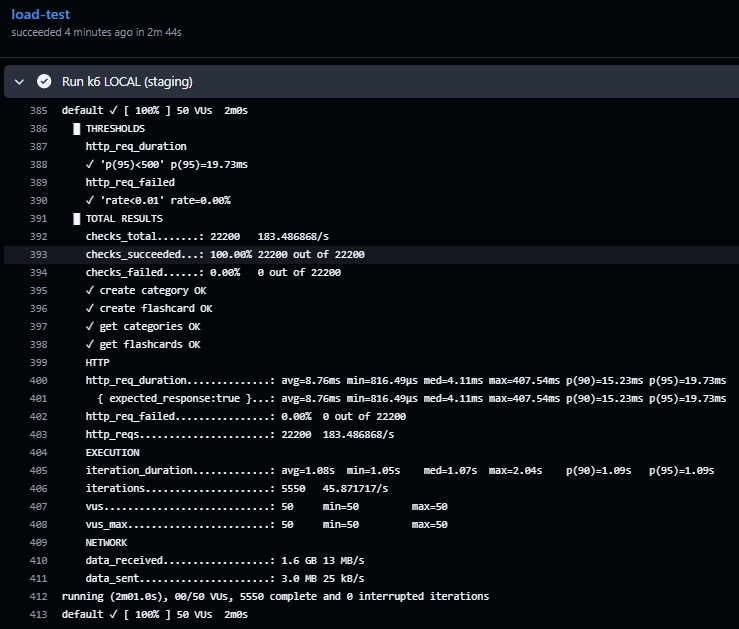
Résultat du job:
Ajout du badge CI
Comme nous l'avons fait pour develop, on intègre le badge de CI pour la branche. Ici un exemple d'intégration du badge dans un README:
 Les badges permettent de suivre l'état de chaque pipeline, en un coup d'œil: 
Une annexe présente les améliorations/changements dans les étapes du pipeline.